
What Is SEO Reporting? Key Metrics and Tools Explained
Search engine optimization (SEO) reporting shows how your site performs on search engines and helps you review metrics that influence your ranking.
You can check organic traffic, keyword positions, conversions, and technical findings in a structured format. This makes it easier to explain performance shifts and plan your next steps with your team or clients.
This guide covers the basics of SEO reporting and highlights the metrics worth tracking. It also walks through how TapClicks helps you pull data together and prepare reports without long manual work.
What Is the Purpose of SEO Reporting?
SEO reporting gives you a focused view of your website’s performance. It helps you understand how search engine optimization supports your marketing strategy.
You can review key performance indicators (KPIs) such as search volume trends, click-through rates (CTRs), and site speed. This helps you spot issues that affect your search engine rankings.
It also helps you see patterns that shape user behavior on your web pages.
Teams use search engine ranking reports to check the health of their SEO efforts. They can track technical issues like broken links and confirm how many backlinks support off-page SEO.
These insights help digital marketers adjust content strategy and address problems before they affect search visibility.
Key Metrics to Feature in an SEO Report
An SEO report should highlight the most useful metrics and present them in an easy-to-understand format.
Here are the key metrics to include in your SEO report.
Executive Overview
The executive overview gives a summary of the reporting period. It highlights changes in organic traffic and noticeable shifts in keyword rankings.
It also points to technical problems that appeared during site audits. Readers should understand the main points here before they move into charts.
This keeps the rest of the review focused and easier to follow.
Core SEO Metrics
This part of the report focuses on SEO metrics that reflect your presence on search engine results pages. These numbers show how users interact with your content and where your pages struggle.
Include metrics such as:
-
Organic traffic
-
Keyword rankings for target keywords
-
Performance of top landing pages
-
Issues found during site audits
-
Core web vitals and page speed
-
Broken links and other technical issues
-
Domain authority and total backlinks
These data points help readers understand the strengths and weak spots in your organic search performance.
Clients can see which pages attract visitors and which areas require attention from SEO specialists.
Optional Additions
Some SEO reports include sections that give more context to the data. Competitor analysis is one option.
It helps you see how other sites rank for similar target keywords and where they outperform your pages. This information can support future content planning or link-building work.
Teams that manage local SEO often add data that shows how the site appears in location-based searches. This is helpful when a business relies on nearby customers or service areas.
You can also add sections that track results from specific SEO campaigns, such as a new content rollout or a recent update to web pages.
How to Prepare an SEO Report
Use these steps to build a report that tracks performance on search engine results pages and keeps your review process simple.
-
Set goals: Choose what you want to measure. You may focus on organic search growth, stronger keyword rankings, or shifts in target keywords. Pick goals that match the results you want to review. Then choose a schedule that fits your workflow. Monthly reports work for most teams, but you can also do weekly or quarterly reviews.
-
Select metrics: Pick metrics that support your goals. Search volume, click-through rates, and organic search traffic help you track visibility. Core web vitals, site speed, and site audits help you track technical progress.
-
Collect data: Use your SEO tools to gather keyword rankings, backlink analysis, broken links, and domain authority. Add findings from site audits to catch issues that affect access. Collect everything in one session to keep the data consistent.
-
Structure your report: Create a summary, then present your core metrics with charts or tables. Keep each section focused on one topic.
-
Explain key shifts: Add short notes next to major changes. Mention drops in site speed, jumps in broken links, or gains in organic search traffic.
These steps help you prepare SEO reports that are easy to read and simple to discuss with your team or clients.
Manual SEO Reporting vs. Automated SEO Reporting Tools
Manual SEO reporting takes time and often leads to uneven results. You switch between tools, export files, and rebuild charts each month. This increases the chance of errors and slows your workflow.
It also makes it harder to keep keyword rankings, site audits, domain authority, and broken links in sync since each tool updates on its own schedule.
Automated reporting tools like TapClicks simplify this. The platform gathers organic search data, keyword rankings, and technical findings in one workflow.
Using Raven tools, you can schedule website audits to run weekly or monthly, or trigger a one-time audit when needed.
Charts update on their own and keep the same layout each cycle. Clients can review target keywords, top pages, and technical findings without sorting through separate tools.
As your content expands, the workload increases. You track more keywords, more audit results, and more changes across search engine results pages.
Automated tools store past data, update new metrics, and keep everything organized. This helps teams understand long-term patterns and respond sooner when search conditions shift.
How to Use TapClicks for Automated SEO Reporting
TapClicks works as a single hub for marketing and SEO data. It connects sources, runs audits with Raven, and turns that information into reports you can share with clients or internal teams.
1. Connect Your SEO and Marketing Data
TapData pulls information from sources such as Google Search Console, Google Analytics, Google Ads, and other channels.
It keeps historical records and refreshes key performance metrics on a set schedule.
You can tie each data source to a client or business unit. This helps SEO professionals and marketing teams review each website's performance without mixing results from different brands.
2. Track Rankings and Audits With Raven
Raven handles rank tracking and technical checks inside TapClicks. It records keyword positions across search engines, locations, devices, and languages.
You can group target terms, compare competitors, and see visibility scores in context.
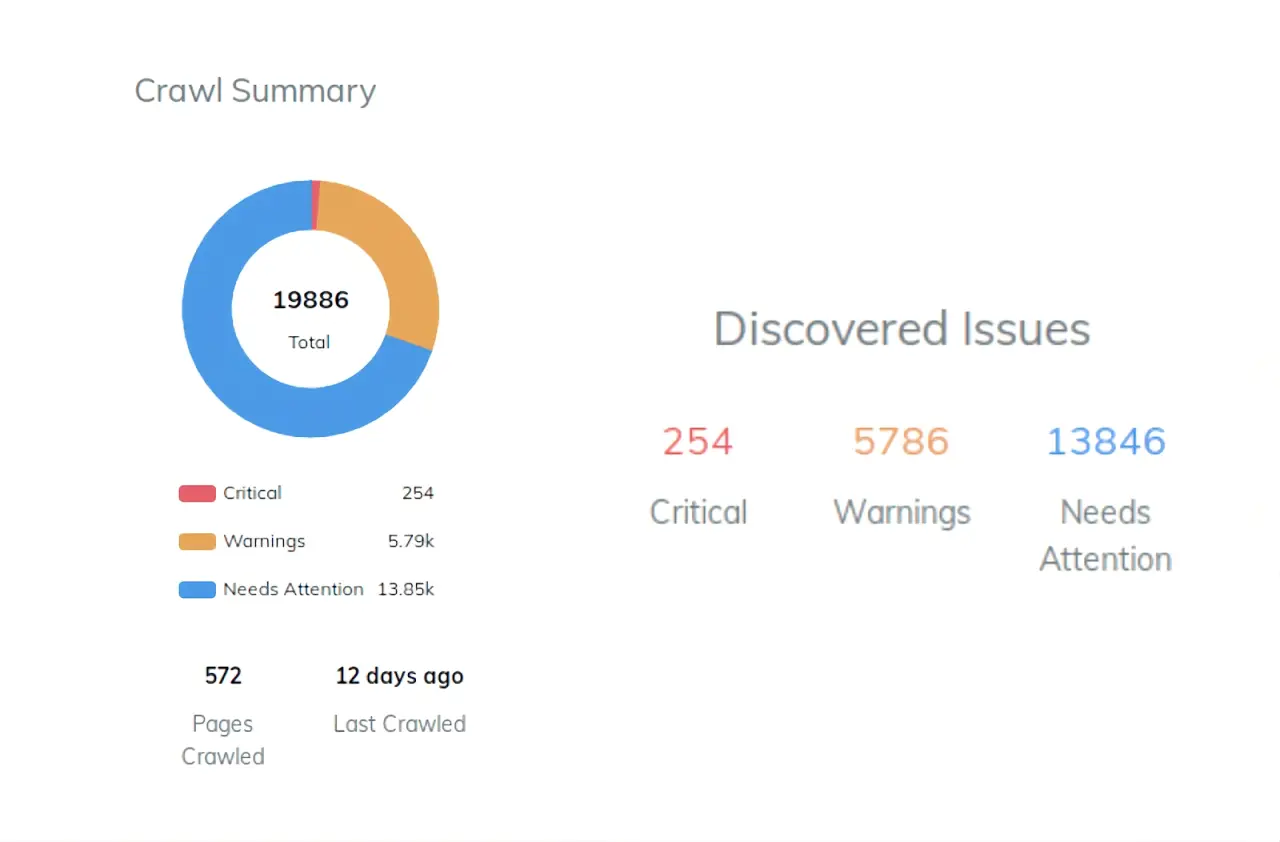
Site audits highlight critical metrics such as crawl errors, broken links, slow pages, and page speed scores.
The SEO Health Score summarizes technical risk so you can see how technical SEO issues affect search coverage.
3. Monitor SEO Performance in Dashboards
Dashboards in TapClicks bring SEO data and digital marketing results together. You can add widgets for keyword rankings, website traffic, backlinks, site speed, and index issues.
These views help you identify trends across campaigns and report periods. A specialist can focus on one domain, while a manager checks several accounts for high-level SEO insights.
Filters make it simple to switch between clients, channels, or time ranges.
4. Create and Customize Reports in Tapreports
TapReports includes Report Studio, which lets you build SEO reports from your live data. You can choose an SEO report template or design your own layout.
Elements like charts, tables, text blocks, and summaries are easy to add. Dynamic fields handle client names and dates, so you can reuse the same report design across multiple accounts.
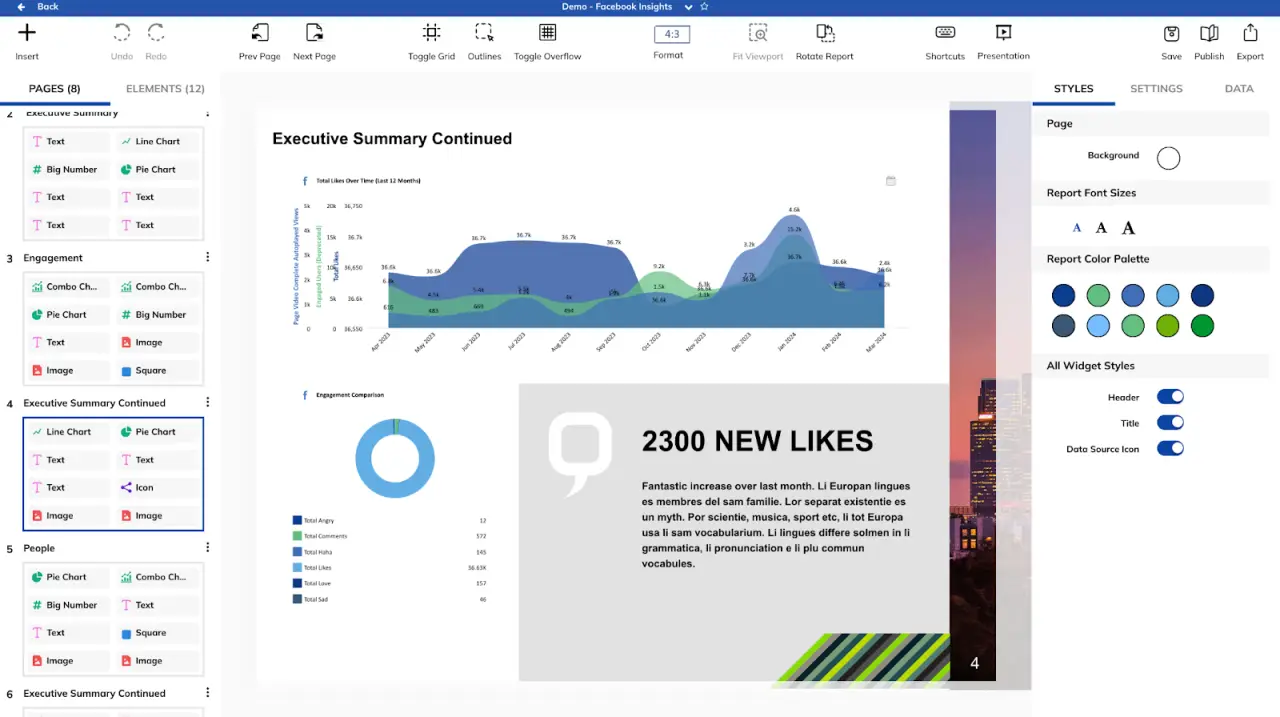
Reports are exported to PDF or PowerPoint for key stakeholders.
If needed, you can also match the look of platforms, such as Looker Studio, to keep your reporting consistent.
5. Use Quick Reports, Scheduling, and AI Agents
Quick Reports help you handle urgent requests with minimal setup. Pick a client and date range, and TapClicks generates a clean summary with rankings and recent activity.
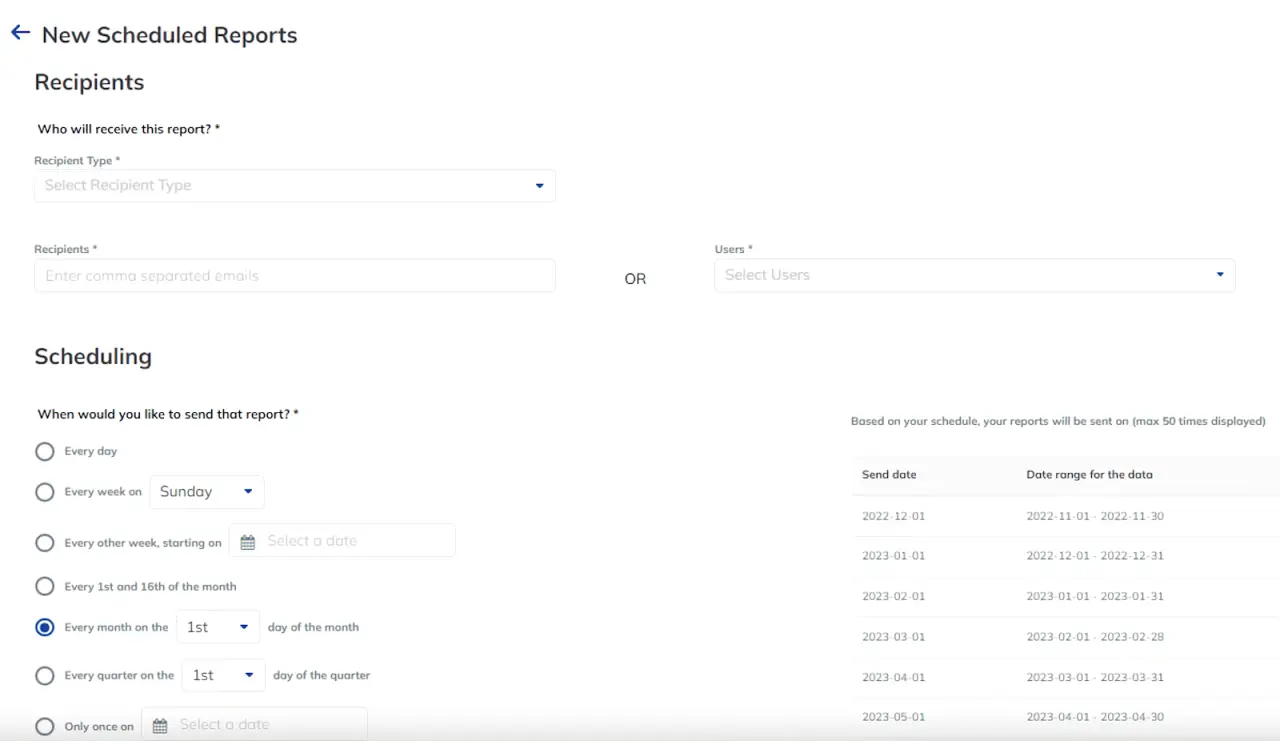
Report Scheduler sends recurring reports on the schedule you set. You choose the format, content, and recipients.
This keeps marketing teams and clients updated without redoing the work each cycle.
AI Agents generate plain-language summaries based on your report’s data. They highlight top performers, explain shifts, and note risks or opportunities.
You can edit the text and add it directly to the executive summary.
Together, TapClicks, TapData, and Raven create a full workflow for effective SEO reporting. You’ll manage data, spot issues, and deliver insights without repeating the same manual tasks.
Book a demo now and see how you can automate SEO reporting with ease!
SEO Reporting Best Practices
These practices help you deliver organized and detailed SEO reports.
-
Keep time ranges consistent: Use the same start and end dates each period. This makes it easier to compare results from Google Analytics, Google Search Console, and unpaid search results.
-
Call out items that need follow-up: Point to issues that require action from developers, content teams, or marketing managers. This keeps everyone on the same page without repeating your main summary.
-
Clarify how data connects: Show how a metric relates to the goal. For example, note when search rankings shift after a content update or when a technical SEO fix improves crawl behavior.
-
Group visuals with text: Pair charts from Google Data Studio with short notes. This prevents clients from misinterpreting trends and keeps the reporting process consistent.
-
Log recurring issues: Track items such as low site speed or indexing problems. A simple log helps you spot patterns across reports without having to re-explain earlier findings.
-
Check for accuracy: Review your data analysis before sharing. Confirm that numbers pulled from multiple SEO tools match the date range and filters you selected.
As you apply these habits, you create a dependable record you can revisit during audits or planning sessions.
Create Reliable SEO Reports With TapClicks and Raven

A steady reporting routine helps you review rankings, audits, and traffic trends without slowing your workflow.
TapClicks ties these pieces together so you can support your SEO strategy with updates that stay consistent. Raven adds ranking data that tracks keyword positions, competitor activity, and SERP features.
Together, they help SEO professionals create SEO reports that highlight key performance metrics and provide room for detailed analysis.
The Imagemark team saw this first-hand. They struggled with long reporting cycles and had to rebuild dashboards for every client.
After switching to TapClicks, they connected their sources, set up branded views, and replaced hours of manual steps with a single automated flow.
This change saved them more than 48 hours each month. TapClicks helped them review website performance across their accounts without the heavy workload they faced before.
This type of setup helps marketing teams stay organized and keep key stakeholders informed on a dependable schedule.
TapClicks keeps your reporting organized by pairing ranking data with audit results and traffic patterns.
FAQs About SEO Reporting
What is reporting in SEO?
SEO reporting shows how your site performs on search results. It gathers metrics such as keyword rankings, organic traffic, and issues found during audits.
These reports help you understand whether your SEO strategy is working and where your pages need attention.
What does an SEO report look like?
An SEO report usually includes a short summary followed by charts or tables. These sections show rankings, traffic patterns, and technical issues that affect visibility.
Many SEO agencies use templates or dashboard tools to organize the information and present marketing insights at a glance.
What does SEO stand for?
SEO stands for search engine optimization. It covers tasks such as keyword research, content updates, and technical checks that help your pages appear in search results.
Is SEO hard for beginners?
SEO can feel challenging at the start, but beginners can learn it step by step. Focusing on keyword research, basic on-page updates, and simple audits gives you a strong base.
As you review your results, you’ll gain valuable insights into how search engines read your content and how users interact with your pages.









