
Power BI vs AgencyAnalytics: Which Should You Choose?
At some point, every agency questions its reporting setup. You look at your dashboards and wonder if there’s a better way to present performance to clients.
That’s usually when the comparison between Power BI and AgencyAnalytics comes up.
Both platforms offer polished visuals and broad data access. But agencies need more than attractive charts. They need reporting that keeps marketing data organized and ready for client presentations.
Here’s how Power BI and AgencyAnalytics compare and what each platform delivers for agencies today.
TL;DR
-
Power BI focuses on enterprise analytics, while AgencyAnalytics centers on automated marketing reporting.
-
Power BI requires external SEO tools and technical setup for marketing use cases.
-
AgencyAnalytics simplifies client dashboards but offers lighter data modeling and workflow capabilities.
-
Neither platform manages full campaign intake, execution, and reporting in one system.
-
TapClicks unifies data, SEO, AI insights, and campaign workflows in a single marketing platform.
Power BI Overview
Image source: microsoft.com
Power BI is a powerful business analytics service within Microsoft Fabric. It combines enterprise business intelligence capabilities with self-service reporting in one cloud environment.
It connects to hundreds of data sources, including Google Analytics, customer relationship management (CRM) systems, sales data platforms, and other advertising and analytics platforms.
Users can pull data into OneLake, which stores one copy of organizational data for reporting and advanced data analysis.
Core capabilities include:
-
Advanced data modeling for complex analytics
-
AI-generated report drafts
-
Deployment pipelines for development, test, and production
-
Power BI Embedded for client dashboards inside custom applications
-
Broad system integration with various enterprise systems
Organizations that require in-depth analysis often rely on these business intelligence capabilities.
What Agencies Like About Power BI
Many marketing agencies value the visual quality of Power BI reports. Users can create interactive dashboards that present campaign metrics in polished formats suitable for executive reviews.
The platform offers broad data connectivity. Agencies that depend on internal sales data or multiple enterprise tools benefit from integration with Microsoft cloud services.
Sharing and collaboration features also help internal reviewers finalize client-facing marketing reports before delivery.
Agencies focused on advanced modeling and internal reporting often appreciate this flexibility.
Limitations of Power BI for Marketing Agencies
Power BI isn’t a marketing-specific reporting platform. It doesn’t include built-in search engine optimization (SEO) tools, rank tracking, or technical site audits.
Agencies that manage multiple clients often need additional marketing platforms to handle automated client reporting.
Licensing can also become complicated. Sharing reports requires paid plans, and embedded analytics comes with separate pricing.
Performance may slow with very large datasets, which can require technical adjustments. Agencies that depend on automated client reports may find that Power BI focuses more on enterprise analytics than on marketing reporting needs.
AgencyAnalytics Overview
Image source: agencyanalytics.com
AgencyAnalytics is a specialized reporting platform focused on automated client reporting. It brings data from more than 80 marketing integrations into unified dashboards so agencies can track performance in one interface.
The platform emphasizes presentation and recurring reporting. Agencies can design client-friendly dashboards with a drag-and-drop editor, apply white-label branding, and host reports on custom domains.
Prebuilt templates cover SEO, pay-per-click (PPC), and social campaigns.
AgencyAnalytics offers the following:
-
Automated report generation with scheduled delivery
-
Report approval workflows on select plans
-
AI Summary and Ask AI for written insights
-
Forecasting tools for performance planning
-
Alerts when metrics hit selected thresholds
AgencyAnalytics delivers reporting capabilities that prioritize visibility and recurring marketing reports over advanced data modeling.
What Agencies Like About AgencyAnalytics
User feedback highlights the time saved through automated reports. Once dashboards are set up, agencies can schedule automated reports and avoid manual formatting each cycle.
AgencyAnalytics' white-label features stand out. Agencies can deliver client-facing reporting features under their own branding, which keeps their identity front and center.
Prebuilt templates also speed up onboarding. Agencies managing multiple clients can duplicate dashboards and maintain consistency in their marketing analytics presentations.
Limitations of AgencyAnalytics
AgencyAnalytics depends heavily on its existing integrations. Agencies that need deeper system integration may require additional tools.
Filtering can feel restrictive when users want to analyze sales data or drill into keyword-level details. Some users also find the difference between dashboards and reports confusing, and report links regenerate after edits.
Customization options are narrower compared to platforms that focus on advanced data analysis and unified data storage.
Agencies that require deeper modeling or complex workflows may need additional solutions beyond AgencyAnalytics.
How Power BI and AgencyAnalytics Handle SEO Data
If SEO reporting drives your client conversations, the differences between these platforms become more noticeable.
Rank Tracking and SEO Data Capabilities
Power BI is a business intelligence platform. It connects to data sources and visualizes whatever you import into Microsoft Fabric and OneLake.
If you want keyword rankings, backlink data, or search metrics, you’ll need a separate SEO tool and then load that data into Power BI for analysis.
AgencyAnalytics focuses on marketing reporting. It integrates SEO data from supported platforms and places rankings inside client-friendly dashboards.
Agencies can track marketing campaign performance and include keyword trends in automated SEO reports without exporting spreadsheets.
The depth of SEO insights, however, depends on the connected tool rather than an in-house audit engine.
Technical SEO and Competitor Monitoring
Power BI doesn’t crawl websites or assign SEO health scores. It displays the data you connect to it.
AgencyAnalytics presents audit and competitor data from its integrations in visual reports. It helps agencies summarize issues and trends for clients, but technical categorization depends on the third-party SEO platform supplying the data.
Agencies that require detailed crawl diagnostics will still rely on dedicated SEO software.
Cross Channel Attribution
Power BI connects multiple data sources within Microsoft Fabric and stores them in OneLake. Agencies can combine CRM, sales, and marketing data in one environment, though attribution modeling requires manual setup.
AgencyAnalytics centralizes marketing channels into unified dashboards. It simplifies reporting across SEO, PPC, and social, and supports automated report generation. Its transformation options are lighter than enterprise analytics platforms.
Choosing between them comes down to whether your agency needs enterprise-grade modeling or marketing-focused reporting.
The Missing Link Between Campaign Intake and Reporting
Both platforms focus on reporting. They don’t manage the full path from campaign intake to final delivery.
Power BI is a complex analytics platform built for advanced data analysis. It connects broad data sources and stores them within Microsoft Fabric.
However, campaign orders, approvals, and trafficking workflows happen outside the system.
AgencyAnalytics focuses on automated reports and presentations. It centralizes an agency’s data and helps create client-friendly dashboards.
Collaboration in AgencyAnalytics shines during report review, but intake and execution still rely on other marketing automation tools.
Neither platform covers essential marketing tools such as order management or production tracking.
As marketing efforts expand, internal teams often rely on separate systems to connect intake, execution, and reporting.
Ready to simplify your marketing operations? Book a demo with TapClicks and see the difference!
TapClicks: A Smarter Alternative to Power BI and AgencyAnalytics
Agencies comparing Power BI and AgencyAnalytics quickly notice that their target audiences diverge significantly.
Power BI often appeals to organizations that require advanced data analysis and advanced technical skills. AgencyAnalytics attracts agencies focused solely on generating visually appealing reports and recurring dashboards.
TapClicks approaches reporting from a marketing operations perspective.
Unified Marketing Data Without Workarounds
TapClicks connects to more than 10,000 data sources, including ad platforms, CRMs, flat files, offline channels, and cloud storage.
Data flows into one environment where metrics remain consistent from client to client.
TapClicks also provides direct connectors into Looker Studio (formerly Google Data Studio). Agencies can centralize their data inside TapClicks while continuing to use external visualization tools when needed.
Historical performance remains accessible as data storage needs expand, without rebuilding reports in spreadsheets.
Reporting and Storytelling That Go Beyond Templates
AgencyAnalytics typically emphasizes presentation and recurring reports. It performs well during report approvals, yet customization options are limited compared to platforms that integrate reporting with campaign execution.
TapClicks produces comprehensive marketing reports through reusable templates, scheduled dashboards, slide decks, and AI-generated summaries.
The focus isn't only on visuals but on helping agencies deliver data-driven insights connected to budgets and performance.
AI Insights That Explain Marketing Performance
Many platforms offer data visualization. TapClicks adds AI agents that review campaigns while they’re active.
The Campaign Performance Agent explains why metrics change. The Budget Insights Agent reviews pacing. The Executive Insights Agent summarizes key performance indicators (KPIs) for client updates and internal reviews.
Agencies don’t just identify customer trends. They understand what’s influencing results before reporting deadlines arrive.
Unify Your Marketing Operations With TapClicks
Power BI centers on enterprise analytics. AgencyAnalytics ultimately hinges on automated dashboards and recurring reports.
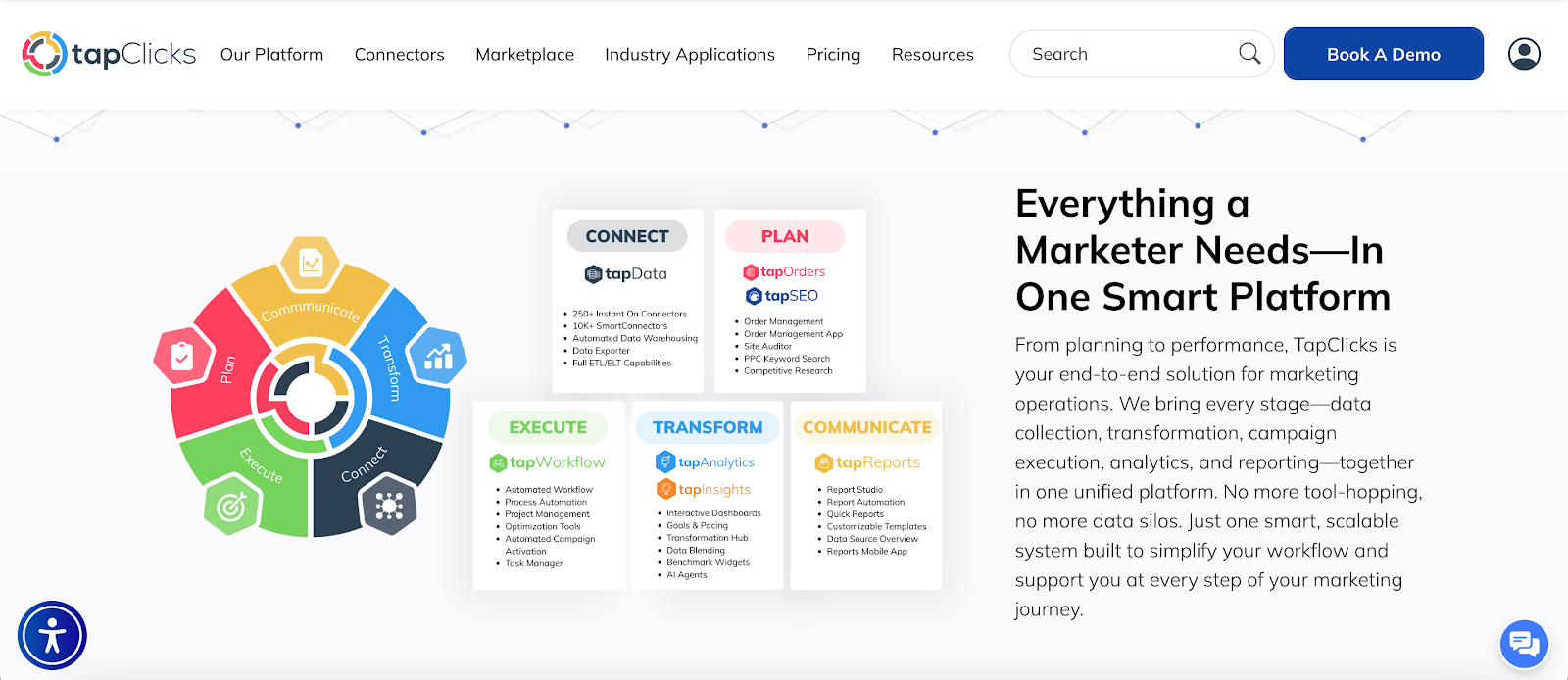
TapClicks connects marketing data, AI insights, reporting, and campaign workflows in one platform.
When comparing Power BI vs AgencyAnalytics, the choice becomes clear. You can manage analytics and reporting in separate tools, or you can run everything inside one connected marketing system.
Many agencies are moving away from disconnected tools and toward a unified platform. See how TapClicks handles reporting, SEO, AI insights, and campaign management in one place.
Book a demo with TapClicks and see how much reporting time your agency can reclaim!
FAQs About Power BI vs AgencyAnalytics
Which is better, Power BI or data analytics?
Power BI is a business intelligence tool, while data analytics is the broader practice of analyzing data. Power BI helps organizations perform data analytics through dashboards and reports.
The better option depends on whether you need enterprise modeling or marketing platforms with stronger client-facing features.
What is Microsoft replacing Power BI with?
Microsoft isn’t replacing Power BI. It has expanded it within Microsoft Fabric, which combines data engineering, storage, and business intelligence in one platform.
Power BI remains the reporting and visualization component inside that ecosystem.
Is Power BI not used in HR analytics?
Power BI is widely used in human resources (HR) analytics. Organizations connect HR systems and internal databases to analyze workforce metrics.
Its data connectivity excels when integrating with enterprise software, but it doesn’t include HR specific workflows by default.









