AI & Data Tools
AI Anomaly Detection for Marketing Dashboards: 7 Use Cases That Catch Problems Before Clients Do
AI anomaly detection in a marketing dashboard automatically flags unusual shifts in spend, clicks, conversions, rankings, or traffic the moment they happen, instead of waiting for someone to notice them in a monthly report. For agencies and in-house teams managing dozens of accounts, that difference — hours instead of weeks — is what separates a quick fix from a client escalation.
Most marketing dashboards are built to display data. Anomaly detection is built to interrupt you when the data stops looking normal. Below are seven concrete use cases for where that distinction pays off, backed by current data on what undetected problems actually cost.
What Is AI Anomaly Detection in Marketing Dashboards?
AI anomaly detection is a monitoring layer that learns the normal range for a metric — spend pace, CTR, conversion rate, keyword position, session volume — and automatically flags data points that fall outside that range. Unlike a static threshold alert (“notify me if spend exceeds $500/day”), an anomaly detection model adjusts for seasonality, day-of-week patterns, and account-specific baselines, so it catches problems a fixed rule would miss and ignores noise a fixed rule would over-trigger on.
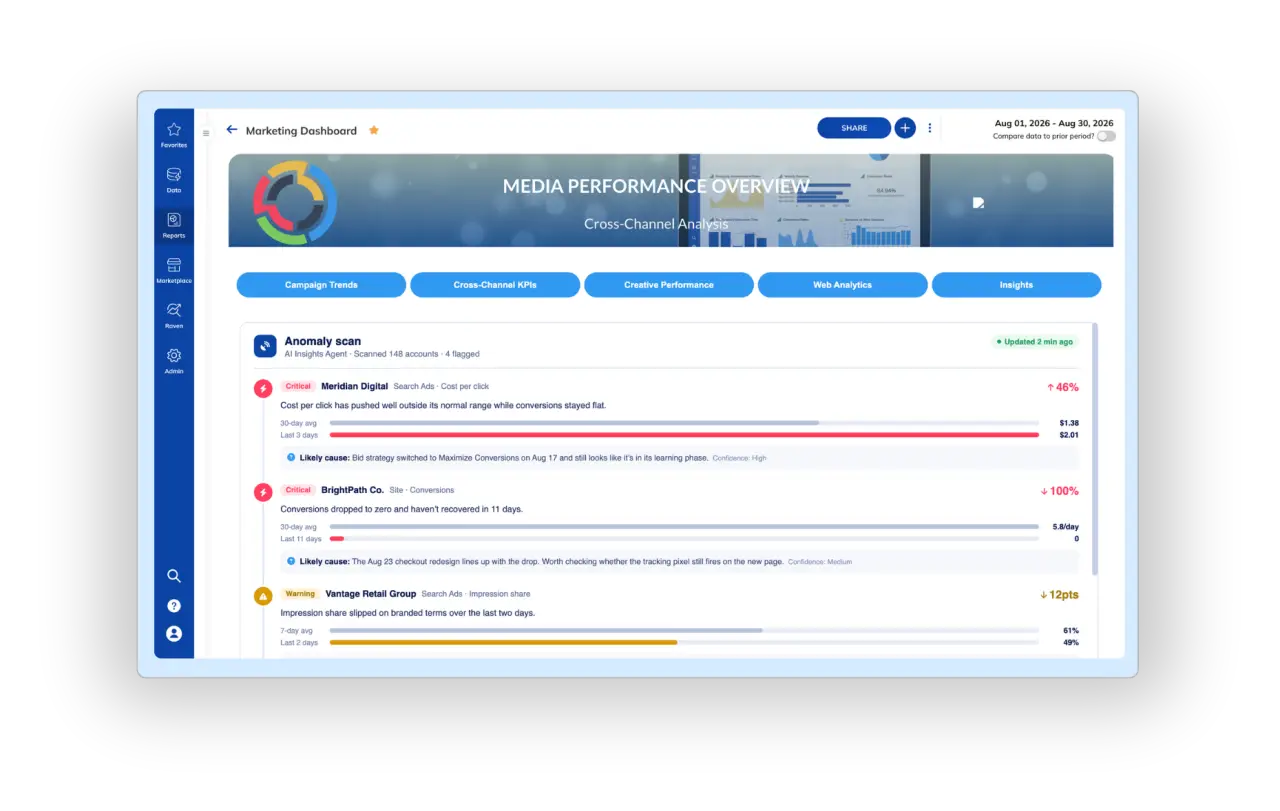
In practice, this looks like a dashboard widget or notification that says a specific campaign’s cost-per-click jumped 340% overnight, or that organic sessions for a client’s highest-value landing page dropped 60% week-over-week — flagged automatically, before anyone opened the report.
Why Anomaly Detection Matters More Than Dashboards Alone
A dashboard only helps if someone is looking at it at the right moment. Most teams aren’t. A study from the Association of National Advertisers found that $22 billion of the $88 billion spent on open web programmatic ads — 25% — was wasteful or unproductive, much of it invisible until the reporting period was already over (MarTech).
The client-retention math is just as direct. Agency churn research from Swydo identifies communication decay — slower replies, shorter messages, skipped QBRs — as an early warning sign that shows up months before a client cancels. The pattern that shows up again and again: clients don’t leave because a metric moved. They leave because the agency didn’t say anything until the client asked first.
AI adoption in marketing has moved fast enough that “someone will catch it manually” is no longer a reasonable plan. 87% of marketers now use generative AI in at least one recurring workflow, up from 51% just two years ago (Salesforce, State of Marketing), and HubSpot’s 2026 State of Marketing data shows AI-assisted teams recovering meaningful hours per week that used to go into manual monitoring and report-building (HubSpot). Anomaly detection is the specific piece of that shift that turns monitoring from a manual chore into a background process.
7 Use Cases for AI Anomaly Detection in Marketing Dashboards
1. Catching Budget Pacing Blowouts Before Month-End
A campaign that’s pacing to overspend by 40% on day 12 of a 30-day flight is a fixable problem. The same campaign discovered on day 28 is a client conversation about a budget overage nobody signed off on. Anomaly detection on pacing — not just total spend — flags the trajectory early enough for a team to adjust bids, pause underperforming ad groups, or reallocate budget within the same billing period.
2. Flagging Sudden CTR or Conversion Rate Drops
A creative that suddenly stops converting, a landing page that breaks after a CMS update, or a form that silently fails — these show up as a CTR or conversion rate anomaly long before anyone would spot it by eyeballing a weekly report. Catching the drop within hours instead of days is often the difference between losing a few dozen conversions and losing a few hundred.
3. Spotting Organic Ranking or Traffic Collapses
A 60% week-over-week drop in sessions to a client’s top landing page could mean a Google algorithm update, a technical SEO issue, a deindexed page, or a competitor overtaking a featured snippet. Whatever the cause, the value of anomaly detection here isn’t diagnosing it — it’s making sure someone finds out the same week it happens instead of at the next monthly SEO reporting cycle.
4. Detecting Tracking and Attribution Breaks
Pixels stop firing. Tags get overwritten during a site migration. A UTM parameter gets dropped from a campaign URL. These failures don’t reduce performance — they make performance invisible, which is worse, because the team keeps optimizing against broken data. An anomaly model watching for an unexplained conversion volume cliff (rather than a gradual decline) is often the first signal that tracking, not performance, is the actual problem — and that attribution reports can’t be trusted until it’s fixed.
5. Surfacing Underperforming Locations or Channels Across a Portfolio
Agencies and franchise marketers managing multiple locations or clients can’t manually scan every account every day. Anomaly detection scales that attention: instead of reviewing 80 dashboards, a team reviews a short list of the accounts that are actually behaving abnormally today. This is the use case that matters most as account load grows — the value compounds with portfolio size.
6. Catching Invalid Traffic and Ad Fraud Spikes
Invalid traffic remains a large, ongoing drain on paid budgets — industry estimates put tens of billions of dollars in wasted spend on invalid clicks annually. A sudden spike in clicks with no corresponding rise in conversions, sessions with unrealistic engagement patterns, or a spend surge concentrated in a narrow time window are all patterns anomaly detection can flag for review before the budget is gone.
7. Replacing the “Why Didn’t You Tell Me” Conversation With a Proactive Alert
This is the use case that actually protects retainers. When a client finds an issue in their own dashboard before the agency mentions it, trust erodes even if the fix is fast. When the agency’s alert reaches the client (or the account team) first — with context on what changed and what’s being done — the same performance dip becomes evidence the team is on top of the account. The data underneath both scenarios can be identical; the outcome for the relationship is not.
How TapClicks Applies This in Practice
TapClicks’ AI Reporting layer runs anomaly detection directly against the same data already flowing into a client’s dashboards, rather than requiring a separate monitoring tool. A few pieces work together:
- Configurable Alerts send real-time notifications when a metric — spend, CTR, conversions, rankings — moves outside its expected range, so account teams find out the moment something shifts rather than at the next scheduled report.
- Our interactive dashboards give teams a live, cross-channel view of performance, which is what makes anomaly detection useful in the first place — it needs a unified data layer to compare against, not a single platform’s siloed numbers.
- AI Insights Agents (TapClicks expanded this to 18 specialized agents) turn a flagged anomaly into a plain-language explanation and recommended next step, so the person reading the alert doesn’t have to reverse-engineer what happened from a chart. See all seven ways teams use them in our guide to AI marketing agent use cases.
Watch: How AI Insights Agents Work
For agencies already using SmartReports for client-facing reporting, the practical shift is that the report stops being the first place an issue surfaces. By the time the monthly report goes out, the anomaly was caught, flagged, and — ideally — already addressed, which is a very different report to deliver.
Common Mistakes When Setting Up Anomaly Detection
| Mistake | Why It Backfires | Fix |
|---|---|---|
| Alerting on every metric fluctuation | Creates alert fatigue; real signals get ignored | Scope alerts to metrics tied to budget, conversions, and account health |
| Using flat thresholds instead of adaptive baselines | Misses seasonal accounts, over-triggers on normal weekend dips | Use models that learn account-specific and day-of-week patterns |
| Routing every alert to one inbox | Alerts get missed or deprioritized | Route by client, channel, or account owner |
| No defined response process | Alerts fire but nobody owns the follow-up | Assign an SLA for who reviews and responds to each alert type |
| Treating anomaly detection as “set and forget” | Baselines drift as accounts grow or change strategy | Review flagged patterns quarterly and retrain thresholds |
Frequently Asked Questions About AI Anomaly Detection
Tap any question to expand the answer.
What’s the difference between anomaly detection and a threshold alert?
A threshold alert fires when a metric crosses a fixed number you set manually. Anomaly detection learns the normal range for that metric — accounting for seasonality and account-specific patterns — and flags deviations from that learned baseline, which catches problems fixed thresholds miss or over-trigger on.
How much ad spend does anomaly detection actually save?
Estimates vary by account, but industry research points to substantial, often invisible waste: a study from the Association of National Advertisers found 25% of programmatic ad spend — $22 billion of $88 billion tracked — was wasteful or unproductive, largely because it wasn’t caught in real time.
Do I need a data scientist to set up anomaly detection?
No. Platforms like TapClicks build anomaly detection into the reporting layer itself, so account teams configure which metrics and clients to monitor rather than building or maintaining a model.
Can anomaly detection work across multiple clients or locations at once?
Yes — this is where it delivers the most value. A single account manager can’t manually review dozens of dashboards daily, but an anomaly detection layer can surface the handful of accounts behaving abnormally out of a much larger portfolio.
Does anomaly detection replace regular reporting?
No. It changes what reporting is for. Regular reports still summarize performance and strategy; anomaly detection handles the real-time layer so issues are caught and often resolved before that scheduled report is even due.
Catch Problems Before Your Clients Do
See how TapClicks Configurable Alerts and AI Insights Agents flag pacing blowouts, conversion drops, and tracking breaks the moment they happen, with the explanation already written.