Last updated: August 3, 2026
How to Report on Instagram Ads Performance: A Complete 2026 Guide

You report on Instagram ads performance by pulling paid metrics from the Meta Ads platform separately from organic Instagram Insights, because Meta's Graph API does not merge the two by default — then combining both into one dashboard so spend, reach, and engagement can be read side by side. Skipping that combination step is the single biggest reason Instagram reports take longer to build than reports for almost any other channel.
That split isn't a reporting-tool limitation — it's built into the API itself. Instagram's aggregated insights fields, like comments_count, return organic comment totals on a photo but explicitly exclude comments on ads that reuse that same photo (Meta for Developers). If you've ever noticed your Instagram ad engagement numbers don't match what's showing on the post itself, this is why.
What data can you actually pull from Instagram ads?
Instagram ad performance data comes from the Meta Marketing API (spend, impressions, CPM, CPC, conversions), while organic Instagram performance — reach, saves, profile visits, story completion rate — comes from the Instagram Graph API's Insights endpoint. They are two separate data sources that happen to describe the same platform.
This matters for reporting because:
- Paid metrics (spend, CPM, CPC, ROAS) only exist at the ad-account level, tied to a Meta Business Manager.
- Organic metrics (likes, saves, reach, follower growth) exist at the Instagram Professional account level.
- Boosted posts create a third, hybrid data trail that touches both systems.
A report that only pulls one side tells half the story — spend without context, or engagement without cost.
Why do Instagram ads and organic Instagram live in different dashboards?
Because the Graph API was built around the account type, not the campaign. Instagram's Graph API only connects to Instagram Business and Creator accounts — personal accounts have no API access at all, professional or otherwise (Elfsight). In most cases, that Business or Creator account also has to be linked to a Facebook Page for authentication and for advanced features like Shopping (Elfsight).
That "Professional account" requirement is the reason a connector built specifically for Instagram Business/Creator accounts — rather than a generic social scraper — is what makes clean, permission-based reporting possible in the first place. TapClicks' Instagram Professional connector pulls this granular, account-level data directly, down to the creative level, so agencies aren't stitching together exports from two different Meta tools by hand.
2026 Instagram ad benchmarks: what "normal" looks like
Knowing the current baseline matters before you can flag a campaign as over- or under-performing in a report. Here's where Instagram ad costs and engagement stand in 2026:
| Metric | 2026 benchmark | Source |
|---|---|---|
| Average CPM | $9.94 (up 15.8% YoY); U.S. average $13.72 | WebFX / Revealbot |
| Average CPC (all industries) | $1.23; e-commerce as low as $0.82, legal as high as $3.47 | AdManage.ai |
| Feed CPC / CPM | $1.46 CPC / $10.82 CPM | AdManage.ai |
| Stories CPC / CPM | $1.15 CPC / $7.94 CPM | AdManage.ai |
| Reels CPM vs. Feed | 30–50% lower | AdManage.ai |
| Reels ad engagement vs. standard feed video | +49% | Digital Applied |
| Overall Instagram engagement rate | 0.50% (down 28% YoY) | Digital Applied |
The takeaway for reporting: Reels consistently costs less and performs better than static Feed placements right now, so any Instagram ads report worth reading should break results out by placement, not just by campaign.
How to build one unified Instagram ads dashboard
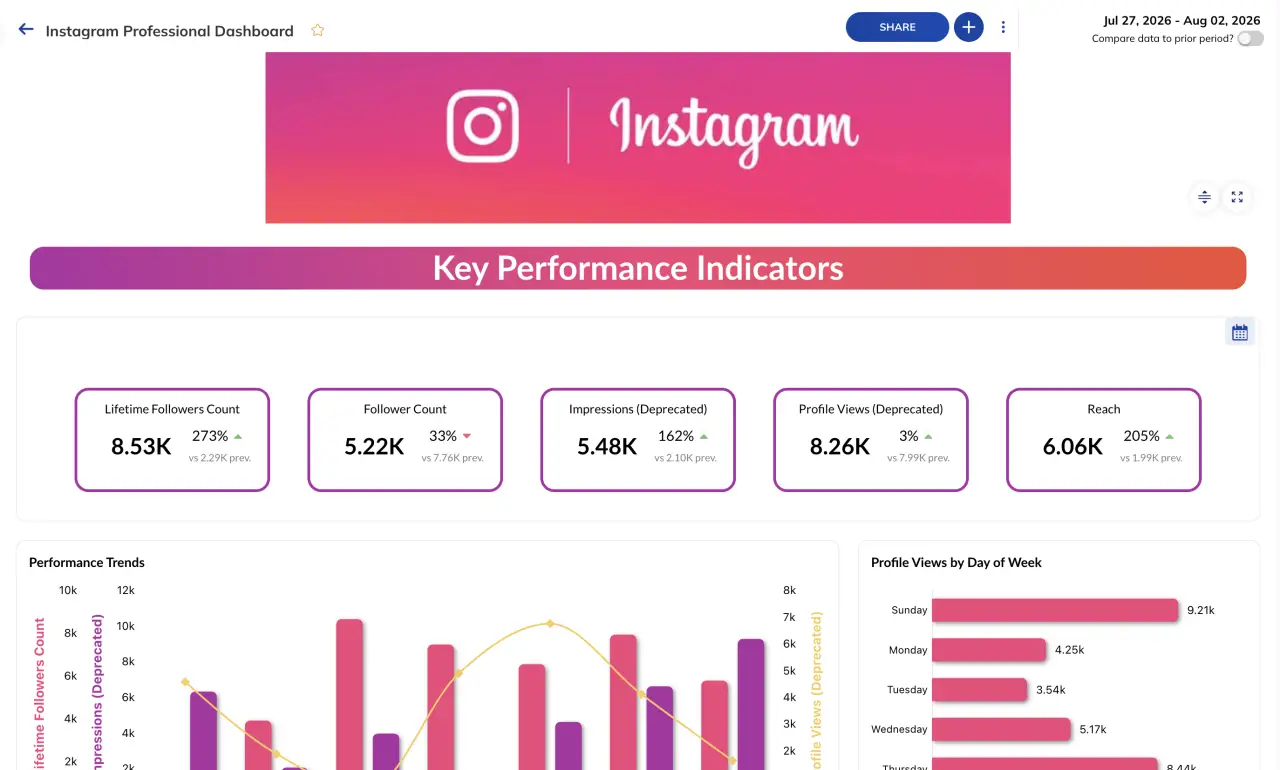
1. Connect both data sources, not just Ads Manager
Pull paid metrics from the Meta Ads API and organic/professional-account metrics from the Instagram Graph API through a single reporting platform, rather than exporting CSVs from Ads Manager and Instagram Insights separately each week.
2. Normalize metric definitions before you compare them
"Engagement" means something different in Ads Manager than it does in organic Insights. Standardize definitions in your dashboard template so a stakeholder isn't comparing two different formulas without knowing it.
3. Break results out by placement
Given the CPM gap between Reels and Feed, a single blended cost-per-result number hides where budget is actually working. Segment every report by placement at minimum.
4. Flag boosted posts separately
Boosted posts pull from both organic and paid data. Tag them distinctly in your dashboard so they don't inflate either the "organic" or "paid" side of the report.
5. Automate the refresh
Once paid and organic Instagram data are connected through the same platform, set the dashboard to refresh on a schedule instead of re-pulling both sources manually each reporting cycle.
Common mistakes in Instagram ads reporting
Reporting spend without engagement context, or vice versa. Either half of the story alone leads stakeholders to the wrong conclusion about a campaign.
Ignoring the placement split. A campaign report showing one blended CPM across Feed, Stories, and Reels obscures a 30–50% cost difference that should be shaping next month's budget allocation.
Treating boosted posts as pure organic wins. If a post's reach was paid-assisted, reporting it as organic performance overstates what your content strategy is actually driving.
Rebuilding the connection every reporting cycle. Manually re-exporting from Ads Manager and Instagram Insights each period is exactly the workflow a dedicated Instagram Professional connector is built to eliminate.
FAQ
Why don't my Instagram ad engagement numbers match my post's organic engagement?
Because Instagram's standard insights fields report organic engagement only — ads-driven engagement on the same creative is tracked separately in the Meta Ads platform and isn't merged automatically.
Do I need a Business or Creator account to report on Instagram ads?
Yes. The Instagram Graph API only grants data access to Business and Creator (Professional) accounts; personal accounts have no API access for insights or ads data.
What's the difference between Instagram Ads Manager data and Instagram Insights data?
Ads Manager reports paid metrics (spend, CPM, CPC, ROAS) at the ad-account level. Instagram Insights reports organic metrics (reach, saves, profile visits) at the connected Professional account level. Both need to be pulled and combined for a complete report.
Are Reels ads actually cheaper than Feed ads in 2026?
Yes — Reels CPM runs roughly 30–50% below Feed placements, and Reels ads generate about 49% more engagement than standard feed video ads.
How often should an Instagram ads dashboard refresh?
Weekly at minimum for active campaigns, with automated delivery rather than manual export, so budget-shifting decisions are made on current data instead of a snapshot from the last reporting cycle.
The bottom line
Instagram ads reporting is harder than it should be because Meta built the API around account type and campaign type, not around a single unified view. The fix isn't a better spreadsheet — it's connecting paid and organic Instagram data through one platform built for Professional accounts specifically, so the placement-level differences that actually drive budget decisions show up in one report instead of two.
Sources
- Insights — Instagram Platform, Meta for Developers
- Instagram Graph API: Complete Developer Guide for 2026 — Elfsight
- Meta Marketing Benchmarks for Facebook & Instagram in 2026 — WebFX
- Instagram Ads Cost in 2026: CPC, CPM + ROI Benchmarks — AdManage.ai
- Instagram Statistics 2026: 180+ Facts, Data, and Trends — Digital Applied
- TapClicks Instagram Professional Connector